Showing posts with label adsense help. Show all posts

Wednesday, October 6, 2010

AdSense's Unacceptable Content Rejection - What is it?

It seems like this is the question everyone's asking right now. There are more and more of these rejection questions showing up in the AdSense Help forums, and most people seem uncertain about what this rejection means. For the most part,  Adsense isn't all that clear about what to do in order to correct this, and won't spell out precisely what the issue is.

In some cases, the unacceptable content is easy to spot when you compare the person's website against the AdSense Program Policies, but it isn't always as simple as that - particularly when English is not the publisher's native language.

Some of the reasons for unacceptable site content that we've been able to come up with in the forums are as follows:

  1. - content that doesn't meet adsense policy (read the policies here: https://www.google.com/adsense/support/bin/answer.py?hl=en&answer=48182)
  2. - content that doesn't meet the webmaster guidelines (http://www.google.com/support/webmasters/bin/answer.py?hl=en&answer=35769) Although the Webmaster Guidelines are listed as "guidelines", AdSense publishers are required to follow these guidelines, making them as important as the Adsense Program Policies. When you are applying to become a publisher, or when you are a publisher, the Webmaster Guidelines are no longer guidelines - they are a requirement, so you'll need to consider these as rules you must follow.
  3. - content that isn't original (articles and content you didn't write). Since the inception of "Caffeine", AdSense has been systematically disabling blogs and websites with copied content, auto-written contents, contents of little to no value (re-purposed content from other websites), written content that doesn't make sense or reads as gibberish, and has been rejecting blogs and websites of this nature in the last few months. If you apply with a blog or website with contents such as this, be prepared to receive a rejection notice. What you need is original content that you've created yourself.
  4. - no content, or very little content. AdSense requires each blog or website to contain sufficient content. If you have a blog with one or two posts, that's not going to be good enough for AdSense to approve. If your website has only one page, then you'll probably get rejected, unless it's a very big place with a LOT of original content.  If you apply with a site that has "no content", then your "content" is non-existent, which makes it unacceptable content.
  5. - blank pages in your website. AdSense doesn't want to see your proposed website, or a website under development. They want your website to be complete, and easy to navigate. It shouldn't have a redirect for the domain URL (unless you've used a 301 redirect), it shouldn't have a frame on the URL that calls the website from another URL (it needs to be a direct URL), it shouldn't have links that don't work or are broken, and it shouldn't have links that lead to blank pages with no content, or with only "ipsum lorem" text. That's the latin text you often see on template pages when you purchase a template or get a free site template. That text is nothing but gibberish - it's meant as a place holder, and you need to replace that with your own text.
  6. - copyright infringements (images or other contents you don't have permission to use). Adsense expects it's publishers to "go the extra mile" and create their own unique contents, including images. If you can't create your own images to use with your text (websites and blogs need text, not JUST images or videos), then they expect you to get permission from the image owner BEFORE you use the images, and you'll need to give credit to the image owner. Images specifically marked as being in the public domain don't require permission for use, but you do still need to have a site with mostly original contents, so using a site full of public domain images and nothing else is likely to get a rejection.
  7. - a website that isn't six months old and doesn't have six months worth of original content. Adsense requires sites from many countries to be six months old before getting approval, and although we don't have a list of specific countries to point to, it appears that there are many more countries AdSense has added this requirement for.
While there may still be other reasons for unacceptable content, these are the most common ones we've come across. It's up to each publisher to ensure their content follows the guidelines and policies set out by AdSense and Webmaster Guidelines so if you receive this rejection, you'll need to spend some time going through your website or blog and digging through your content to find the areas you'll need to amend, remove, or add to.

If you have taken the time to study your site and the policies and still can't figure out what's wrong, then you can ask in the AdSense Help Forum to see if someone else can see the issues at hand, but it's really the publisher's responsibility to at least try to figure out the problems first. Help is always available, but learning how to decipher your site's problems will help you keep your account in good standing in the future.

Wednesday, October 7, 2009

Why You Need "Alt Text" Tags

Bookmark and Share


What exactly is "alt text"? AltText is something you may have heard of, but aren't sure what it is, or what it's purpose is. When you upload an image to your blog, the "alt text" is the stuff you normally won't see, but it describes your image to those who can't visually see your image.

And there are other purposes - a search engine bot (robot) is what crawls through your website or blog and indexes your pages and posts. These bots can't "see" images, they only read text. If your image doesn't have alt text, the bot doesn't know it's there, so your article or website might look like it has a lot of big spaces to the bot, and very little actual content.

This is particularly a problem for those whose sites contain a large number of images - such as mine do. If you want to be indexed properly and have your sites and pages show up well in search engine results, you need to optimize your images by using alt text. It also makes it difficult to get approved for AdSense if you have a lot of images, but no alt text tags. After all, AdSense wants sites or blogs with a lot of good, original content. If it can't see your pictures, then there could be a lot of content "missing" as far as the AdSense bot is concerned.

Another good reason for using alt text is your visitors themselves. Some people still do have dialup connections, and some can be pretty slow when they need to load a lot of images. Because of this many dialup users turn off image loading in their browsers, which means they will only see a blank page if you have no text, or very little text and a lot of space where the images should be, or simply a bunch of boxes with red "x"s in them in place of your images. If you use alt text, these browsers will see that text so they will at least know what the image is.

And then there are those browsers who are blind, or classed as "legally blind". And before you ask, yes the blind do surf and enjoy the internet. At least when people consider them and use alt text for the images. There are voice programs which read text on internet pages that are used by the blind. Their computers read to them, but this software can usually only recognize text, just like a search engine bot. If there's no alt text, there's nothing for the software to read.

Lastly, if you own the image (and you should if you are uploading it) or if the image is being posted with permission of the owner, you can also add this text in the alt text area, or you can add a caption to the image so people are given proper credit for the images.

Those who don't use alt text as often as they can could be missing out on a lot of visitors.

So, how to put the alt text on your images? If you use a blog service like wordpress or blogger, they have box right in the imager uploader where you can type your alt text. Below are screenshots of how to add the alt text to your blogger images:

Screenshot showing how to add alt text to images inserted in blogger posts.


  • upload your image into your post
  • click the image to get the options box
  • click properties
  • type description in the text box that opens and click OK

Screenshot showing the place for adding alt text to blogger images.


Make your blog or website more accessible by using the Alt Text whenever you upload an image - this newer method works on old previously uploaded images as well!


(note: originally posted by me on another of my blogs)

Thursday, September 24, 2009

Using the AdSense Help Forum Effectively

Bookmark and Share

If you want to get answers that help resolve your problems or questions in the AdSense Help Forums, there are some things you can and should do before you start posting to the forums.

First, you need to read the AdSense Support Forums Terms of Service. You shouldn't post profanity, or advertising. You also must not use your website address as a signature. This is considered advertising. You can, however, use your Google Profile to list your websites if you so choose. Posters can access your Google Profile from your nickname on the forums. (You may post your website url in your question if it's necessary to the question, just not as a signature.)

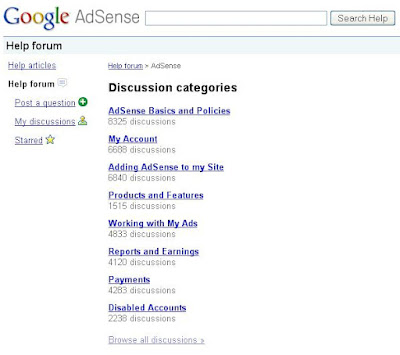
Next, at the Help Forum "home page" you'll see a list of discussion categories. These links will bring up questions in each category, filtering out other categories. It's helpful to read through other postings, because often your question will already have been answered in someone else's post. On the right side of the page is a listing of "popular" discussions that may already answer your question as well.


At the bottom of the home page is a link to "browse all discussions". When you click on this you get all the discussions and threads in the forum, including some you should check before you begin a new post. At the top of the help forum discussions are "pinned topics". These are topics posted by AdSense/Google Employees, and often will include things like current problems (ie: "Known Issues"). If there are system bugs that many publishers are experiencing, you will probably find it here in the pinned section, unless it has already been resolved. Many duplicate complaint posts could be avoided if people would check the pinned topics first.

Another thing to do before posting your own topic is to search the forums. Just think about where you are. You are in a forum hosted and run by Google. And who are Google? They're the people who are pretty well known for their search engine, which means they do "search" extremely well. You should make use of this. Type your problem into the search bar at the top and click the "search help" button.


Look through the results and see if your problem (or a similar complaint or question) is there, and if it has been answered or not.

After doing all of that, if you still have a question that hasn't been asked or that is more specific than what's listed, then go ahead and post your question. Click the "post a question" link on the left menu.

How to Post an Effective Question

If you want an answer to your question, then you need to post a question that addresses your issue as clearly as possible and contains details. Questions like "I can't get approved" or "What's wrong with my website" or "Why?" are really not going to get you helpful answers.

Don't:
  • post questions unrelated to AdSense problems
  • post the full question in your title
  • post one word questions (why? when? what? help!)
  • post the same question over and over again (simply edit your question or post a "bump" and it will move back toward the top of the forum again)
  • post "bumps" every minute
  • post without checking the help articles (link is in left sidebar)
  • post in any language except english (there are help forums available in other languages - down at the bottom of the page linked here is a drop down box with the avalilable languages for help forums)
  • post spam (this will get you banned from the forum)
  • post your email address, publisher ID or personal details
  • post your website address unless the help you are asking for is AdSense related
  • post personal insults and profanity
  • post links to pornographic websites
  • post adlinks in the forum
DO
  • use a title related to your question
  • post a full explanation and question within the body of the post. If your question doesn't make sense, we can't answer it properly without asking further questions.
  • use the search function before posting
  • read the help articles before posting
  • include your website url if you think people need to look at your site to offer help (this is necessary for questions on ads that won't display, help with disabled accounts, ad placements, ads that aren't related to your content etc.)
  • check your posts for answers instead of posting again
  • try to be patient. There are a lot of questions every day and not that many of us to answer them.
  • try not to take your anger a frustration out on the people answering your questions. Almost none of them are employed by Google or AdSense. Most of them are volunteers who are publishers, just like you. Unless a responding poster has "Google Employee" by/under their name, they are just ordinary folks trying to help others.
If you post a question and can't find it later, you can check your profile and see a listing of your questions. In the menu bar at the left is a link for "My Discussions" this will take you to your profile where all the questions you've asked are listed. You can click the link for the post you want and it will take you to that thread.

If you post a question that doesn't get answered, amend your original question to bring it back to the front of the forum where people can see it again. Posting the same question multiple times simply makes everyone annoyed. There are some types of questions that we just can't resolve in the forums, so you may not get an answer.

Please note that questions related specifically to how to place your AdSense code into your website are often more related to:
  1. the specific website creator you are using
  2. the webhosting or blog service you are using
than they are to AdSense. Unless one of the volunteers has used your specific website builder, questions of this nature may not get answered. Your best choice for questions relating to your website is to ask at the webhosting help center, or the web builder help sections.

Please try to remember that as AdSense publishers most of the volunteers have experienced similar problems and have experienced the same frustrations as you have. Please don't come into the forums with a nasty attitude towards those who are trying to help you. All this will do is make the volunteers reluctant to try and help you.

You can express your frustration, just don't make it a personal attack on your helpers. That won't resolve anything.

If your question is related to other Google services (YouTube, gmail, google search, blogger, etc.) then you need to ask your question in the help forum for the related product. You can start here at the "Getting Started with Google Help" page, or if you want to look at all the help forums and groups available for Google services and products you can do that here.